
実現する形態、
<ラズピコ5はサーバー運用>
・Luantiサーバー(ユーザー接続はtailscaleを使う)
・管理者:サーバー運用とユーザー管理
・一般ユーザー:ユーザーごとにLuantiサーバーを起動、つまり個別のワールドを持てる様にして、デスクトップも分離させて持たせる
<目的に合いそうなVNCサーバー>
TigerVNCがピッタリ感
tigervncのインストール、
$ sudo apt install tigervnc-standalone-server tigervnc-common -y

アカウント(luanti1)を作る、

$ sudo adduser luanti1

$ groups luanti1
luanti1 : luanti1 users

$ tigervncpasswd // tigervncのpw設定する(tigervnc login時必要)
<設定ファイル:サービスの定義>
luanti1@rasp5:~ $ cat ~/.config/systemd/user/tigervnc@.service
[Unit]
Description=TigerVNC Server
After=network.target

# direct to the user directory
[Service]
Type=forking
ExecStartPre=/bin/rm -f /home/luanti1/.vnc/%H:%i.pid

ExecStart=/usr/bin/tigervncserver %i -geometry 1280x800 -localhost no -SecurityTypes VncAuth,TLSVnc -xstartup /home/luanti1/.vnc/xstartup

ExecStop=/usr/bin/tigervncserver -kill %i
Restart=on-failure

[Install]
WantedBy=default.target
<設定ファイル:サービス起動設定>
luanti1@rasp5:~ $ cat ~/.vnc/xstartup

#!/bin/bash
unset SESSION_MANAGER
unset DBUS_SESSION_BUS_ADDRESS
exec dbus-launch --exit-with-session startlxde-pi
<ブート時自動起動の設定>
ユーザごとにログインして以下を実行する、
サーバーでboot時に有効にするなら、
# linger有効化(一般ユーザでやれば他人は変更できないからそれがお勧め)
$ loginctl enable-linger username        // usernameは実際のユーザ名(ここではpi)に置き換え
# userサービス enable
$ systemctl --user enable tigervnc@:1
# 今すぐ起動
$ systemctl --user start tigervnc@:1

ステータス確認、
$ systemctl --user status tigervnc@:1
● tigervnc@:1.service - TigerVNC Server
~~以下略

 $ ss -tlnp | grep 5901
LISTEN 0      5                          0.0.0.0:5901       0.0.0.0:*    users:(("Xtigervnc",pid=203908,fd=7))
LISTEN 0      5                             [::]:5901          [::]:*    users:(("Xtigervnc",pid=203908,fd=8))
tigervnc@:1はそのユーザーの仮想画面番号を指定する
VNCクライアントの管理画面はこんな感じ、
・LAN内のアクセスは禁止している
・予備のためにRealVNC(port 5900:piのみ接続可能)は活かしてある
・TigerVNCの画面はport 5901(pi用)/5902(luanti1用)を用意してある
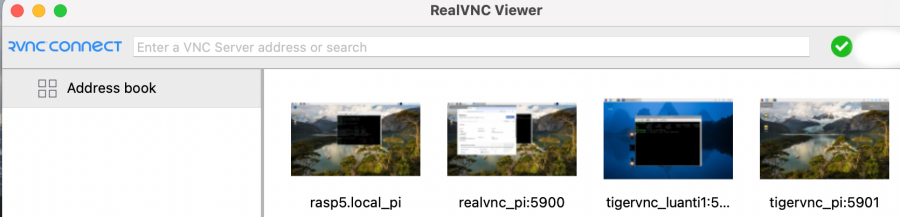
以上で複数ユーザーがユーザーごとにLuantiサーバーの起動とデスクトップ画面の使用できる様な環境設定を完了、sshも許可してるからそれは非常用かな
admin