スレッド間通信をchannelからmutexへ(@Rust)

メモリ管理を厳密に実行できるRustではスレッド間通信にmutexを使うのも現実的のように思います。おそらくchannelよりは軽量だろうと想像されるから。

https://doc.rust-jp.rs/book-ja/ch16-03-shared-state.html

を参考にchannel版からmutex版に書き換えてみます。

https://isehara-3lv.sakura.ne.jp/blog/2023/10/10/スレッド間通信でchannelを使うrust/

肝は追加されたクレートのMutexとArcになるでしょう。Rcはスレッドセーフではないので多少処理は遅くなるけれどもArcが用意されているようです。

以下のコードではchannel版をコメントアウトしてmutexに置き換えています。

use std::sync::{Mutex, Arc};
use std::thread;
use std::time::Duration;
//use std::sync::mpsc;

fn main() {
    //let (tx, rx) = mpsc::channel();
    let count = Arc::new(Mutex::new(0));
    let mut handles = Vec::new();

    for i in 0..3 {
        //let thread_tx = tx.clone();
        let count = Arc::clone(&count);
        let handle = thread::spawn(move || {
            for j in 1..10 {
                println!("hi number {} {} from the spawned thread!", i, j);
                thread::sleep(Duration::from_millis(1));
            }
            //thread_tx.send(i).unwrap();
            let mut num = count.lock().unwrap();
            *num += 1;
        });
        handles.push(handle);
    }

    for i in 1..5 {
        println!("hi number {} from the main thread!", i);
        thread::sleep(Duration::from_millis(1));
    }

    for handle in handles {
        handle.join().unwrap();
    }

    //drop(tx);       // without drop(), this program doesn't terminate, wait for tx forever
/* 
    for received in rx {
        println!("Got from the threads : {}", received);
    }
*/
    println!("Result: {}", *count.lock().unwrap());

}

mutexで定義した変数の型は整数型ではない(VScode上では:Arc<Mutex[i32; 1]>>と表示されている)ので、unwrap()してやらないといけないのはRust特有ですが、Rustのスレッド間通信(共有)でmutexも選択肢に入りそうです。


admin



スレッド間通信でchannelを使う(@Rust)

Rustの場合にはchannelを使わなくても、メモリ管理がきちんとされているのでmutexでも良さそうなのですが、channelの方が使うのは簡単だと思う。ほぼGolangと同等の機能ですが、rx/txを同時に定義するのは異なります。Golangは -> もしくは <- でインアウトを切り替えるし、channelのサイズも指定しますが、RustではFIFOのように動作します。

以下のコードは、

https://isehara-3lv.sakura.ne.jp/blog/2023/10/06/並行処理rust/

にスレッド起動後にスレッドの番号をchannelに送るようにしたもの。一点注意すべきはtxはmainスレッド中で生成されているので、for received in rx処理はdrop(tx)しないと無限待ちになること。もしクロージャー中ならば、そのライフが終わった時点でdrop()されますが。

use std::thread;
use std::time::Duration;
use std::sync::mpsc;

fn main() {
    let (tx, rx) = mpsc::channel();
    let mut handles = Vec::new();
    for i in 0..3 {
        let thread_tx = tx.clone();
        let handle = thread::spawn(move || {
            for j in 1..10 {
                println!("hi number {} {} from the spawned thread!", i, j);
                thread::sleep(Duration::from_millis(1));
            }
            thread_tx.send(i).unwrap();
        });
        handles.push(handle);
    }

    for i in 1..5 {
        println!("hi number {} from the main thread!", i);
        thread::sleep(Duration::from_millis(1));
    }

    for handle in handles {
        handle.join().unwrap();
    }

    drop(tx);       // without drop(), this program doesn't terminate, wait for tx forever

    for received in rx {
        println!("Got from the threads : {}", received);
    }

}

出力の最後部分だけ、

~~~~~~
hi number 0 9 from the spawned thread!
hi number 2 9 from the spawned thread!
Got from the threads : 0
Got from the threads : 1
Got from the threads : 2

P.S. 同じスレッド間での通信になっていたので修正(2023/10/11)

送信エンドポイントはclone()しないとコンパイルが通りません(moveしたものをdrop()はできないから)。clone()して複数の送信エンドポイントから送信でもrxに集約されるようです。


admin

並行処理(@Rust)

Rustももちろん並行処理ができて、そのロジックは他の言語と類似ですが、簡単なコードで確認。Rustのドキュメンtの並行処理を多少改変しています。

どこが改変かというと、スレッドを複数spawnした時の終了待ちをhandleを配列(handles)に入れて、配列からhandleを取り出して全ての終了を待つようにしています。GolangのWaitGroupに相当する機能はなさそうなので、

use std::thread;
use std::time::Duration;

fn main() {
    let mut handles = Vec::new();
    for i in 0..3 {
        let handle = thread::spawn(move || {
            for j in 1..10 {
                println!("hi number {} {} from the spawned thread!", i, j);
                thread::sleep(Duration::from_millis(1));
            }
        });
        handles.push(handle);
    }

    for i in 1..5 {
        println!("hi number {} from the main thread!", i);
        thread::sleep(Duration::from_millis(1));
    }

    for handle in handles {
        handle.join().unwrap();
    }
}

<実行結果>

hi number 1 1 from the spawned thread!
hi number 2 1 from the spawned thread!
hi number 1 from the main thread!
hi number 0 1 from the spawned thread!
hi number 1 2 from the spawned thread!
hi number 2 2 from the spawned thread!
hi number 2 from the main thread!
hi number 0 2 from the spawned thread!
hi number 1 3 from the spawned thread!
hi number 2 3 from the spawned thread!
hi number 0 3 from the spawned thread!
hi number 3 from the main thread!
hi number 1 4 from the spawned thread!
hi number 2 4 from the spawned thread!
hi number 0 4 from the spawned thread!
hi number 4 from the main thread!
hi number 1 5 from the spawned thread!
hi number 2 5 from the spawned thread!
hi number 0 5 from the spawned thread!
hi number 1 6 from the spawned thread!
hi number 0 6 from the spawned thread!
hi number 2 6 from the spawned thread!
hi number 0 7 from the spawned thread!
hi number 1 7 from the spawned thread!
hi number 2 7 from the spawned thread!
hi number 0 8 from the spawned thread!
hi number 1 8 from the spawned thread!
hi number 2 8 from the spawned thread!
hi number 0 9 from the spawned thread!
hi number 1 9 from the spawned thread!
hi number 2 9 from the spawned thread!

二重ループ処理の複数(三個)のスレッドが動作しています。もちろんスレッドの実行順序は指定できません。


admin


Rustのテキスト

Rustの場合、コミュニティがしっかりしていてドキュメントの整備もきちんとされているので、特別にテキストを購入する必要はなさそうです。

https://doc.rust-jp.rs/book-ja/title-page.html

の15章あたりまで、ダラダラと読んでますが、例は

https://doc.rust-jp.rs/rust-by-example-ja/

こちらを使えば、一通りの理解はできるように思います。

結局のところ、Rustの仕様のかなりの部分はメモリ管理をコンパイラが判断できるようにユーザーが記述するコードで指示することに集約されるだろうと思う。したがって堅牢性と実行速度を要求するOSやアプリケーションにはRustを使うと言う選択になるんだろう。組み込みやIoTなどで小規模な開発では、コードが冗長になりがちなので、Rustである必要性はあるのかと言う感覚はあります。


admin

クロージャー(Golang and Rust)

現代の言語ではクロージャー機能を多くの言語で持っていますが、同じ機能(単純な1の加算)をGolangとRustで実装の比較。Rustの説明で出てくる、クロージャーは環境をキャプチャーできる匿名関数という定義はわかりやすい。

<Golang>

package main

import "fmt"

func add(i int) func() int {
	n := i

	clo := func() int {
		n++
		return n
	}

	return clo		// equivalent to specify anonymous function here and maybe it's more popular
}

func main() {
	a := add(1)
	for i := 1; i < 10; i++ {
		fmt.Println(a())
	}
}

<Rust>

fn f1(i: i32) -> Box<dyn FnMut -> i32> {	// FnMut recieves &mut self
	let mut i = i;						// dyn keyword sepcifies a trait pointer in the heap area
	Box::new(move || {				// force to allocate values in the heap area
		i += 1;
		i
	})
 }
 
 fn main() {
	 let mut cup = f1(0);
	 for _ in 1..10 {
		 println!("{}", cup());
	 }
 }

コードの参考は、

https://scrapbox.io/takker/Rustで関数を返す関数を作

FnMutの解説は、

https://qiita.com/hiratasa/items/c1735dc4c7c78b0b55e9

Fnでは変更できないし、FnOnceでは一度しか呼べないのでFnMutの指定になります。

比較してみると、Rustの方が細かな指定が必要ですが、これはメモリ管理に関する指定を明示的に行わなければいけない言語だからでしょう。したがってこれぐらいの例では変わらないけれども、コードは長めになります。比較してGolangは細かな操作はしなくとも使うだけなら簡単ということになるでしょうか。

Box<dyn … >については、

Boxは変数をスタック領域ではなくヒープ領域への割り当て、dynについては以下の通り、

https://doc.rust-lang.org/stable/rust-by-example/trait/dyn.html

“Rust tries to be as explicit as possible whenever it allocates memory on the heap. So if your function returns a pointer-to-trait-on-heap in this way, you need to write the return type with the dynkeyword


admin


構造体

GolangやRustでは積極的に構造体を使い、また構造体を効率的に使うための言語仕様も用意されていますが、その背景は必要なデータセットは構造体にまとめることで、読みやすく従ってバグも入りづらいコードを書くことにあるだろうと思います。

同じ機能をGolangとRustで記述してみます。

<Golang>

type Rectangle struct {
  length  float64
  breadth float64
}

func (r Rectangle) area() float64 {
  return r.length * r.breadth
}

<Rust>

struct Rectangle {
    length: f64,
    breadt: f64,
  }
impl  Rectangle{
  fn area(&self) -> f64 {
    return &self.length * &self.breadt
  }
}

Rust呼び出し方、

  fn main() {
    let mut rec = Rectangle{length:0.0,breadt:0.0};

    rec.length = 20.0;
    rec.breadt = 30.0;

    print!("{}", rec.area())
}

Golangでは

(r Rectangle)

を使って構造体と結びつけ、Rustでは

impl Rectangle

でインターフェースの如くimplementでメソッドを定義していますが、上記二種の結果は全く同じ出力をするし、記法にも大差ありません。c++ではこのような記法はないので、現代の言語の特徴と言ってもいいのではないかと思います。


admin

関数(メソッド)ごとに文字列と文字列スライスは意識しないといけない(@Rust)

Rustの文字型にはString(可変長)、文字列スライス(固定長)、char型(1バイト)の三種類がありますが、関数やメソッドによって引数や適用が変わってきます。

以下は文字列を全て小文字に変換する関数to_lowercase()の例ですが、操作対象は文字列スライスでなければ機能しませんし、出力はString型になります。

VScodeだと、型は自動で補完してくれますね。

fn main() {
    let text = "heLLO worLd";
    let result: String = text.to_lowercase();
    let search= "worl";

    if result.contains(search){
        println!("{} and {}", result, search);
    }

以下は関数(メソッド)のAPIの記述です、

何故、操作対象は文字列スライス型でなければならないかですが、おそらく変更がなくて参照するだけだろうからだと思います。処理量の観点でも参照の方が少なくて済むだろうし。


admin


ラズパイPico WのRust

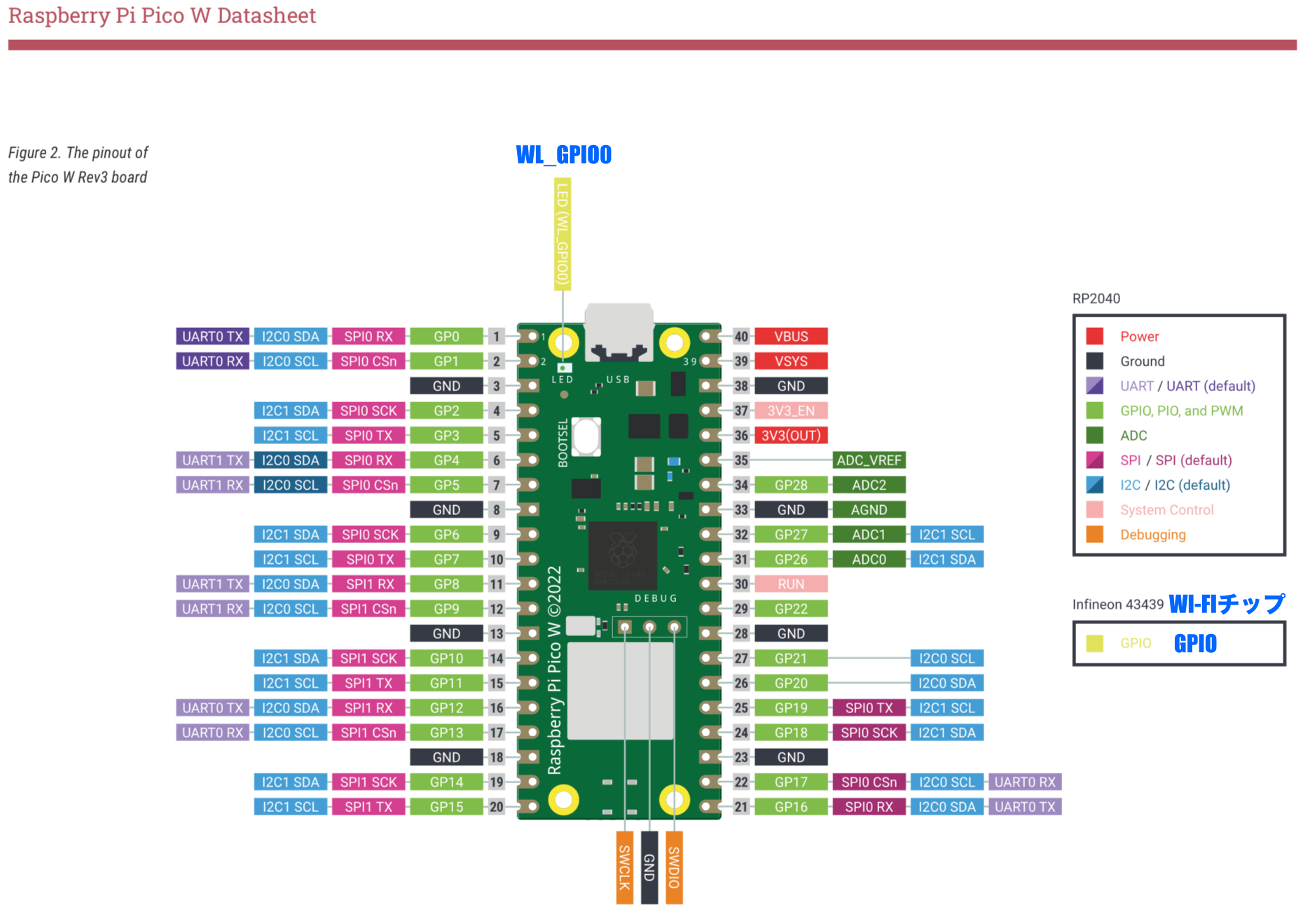
ラズパイPico WのLチカが動かないなと思って、専用のファームがあるのかとも思ったけど、そんな理屈はない。MicroPythonはインタプリタだから実行環境必要だけど、Rustは実行ファイルになっているからそのまま実行出来るはず。

で実はHALがPicoとは別物(embassy)で、オンボードのLEDは無線モジュールから出力されている。MycroPythonやArduino IDEではPico/Pico Wのハードの違いを開発環境側で吸収しているんだろう。

この辺の記述は以下のリンクが参考になります。

https://qiita.com/Azi/items/422c654bb476e0abf118

LEDブリンクのソースコードは、

https://github.com/embassy-rs/embassy/blob/main/examples/rp/src/bin/wifi_blinky.rs

になります。Pico W用のHALは今現在も活発にアップデートされているので、安定的に使えるようになるのは今少し時間が必要です。それまではMycroPython/Arduino IDE/VS code環境で使うのが良さそうです。


admin

Rustで特徴的と思ったところ(その1)

Rustのオンラインブック、

https://doc.rust-jp.rs/book-ja/title-page.html

を読み始めて、第5章までの分です。自分の他言語経験から見てユニークと思えるところを、並びは時系列です。特にC/C++などで起こるメモリ管理上のバグの作り込みを防ぐためのメモリ管理機能(所有権)がいちばん特徴的だろうと思う。

・crate : クレートはRustソースコードを集めたものである、バイナリ形式でもそういうけども

・Cargo.toml : Tom’s Obvious, Minimal Language、パッケージのリストと版数を指定するテキストファイル

・Cargo : Rustのビルドシステム兼パッケージマネージャ

 cargo checkでコンパイルエラーがチェックできる

・println! : !はマクロの意味、簡易に結果出力で使用で構造体ではコンパイルエラー、回避方法(20行ぐらい下)はありますが

・関連関数

String::new() :newは関連関数で、Stringインスタンス作成する

・参照変数のmutable化

io::stdin().read_line(&mut guess) : &mutは参照変数をミュータブルにする、記法はmut &guessではない

・Cargo.lockファイル : ビルドの再現性確保のためにクレートのバージョンを保存しておく、自動生成されユーザがいじるファイルでは無い

・traitはデータ型を分類する仕組み、crateの要素(任意の型となりうるSelfに対して定義されたメソッドの集合のこと)、類型的にはJavaのinterfaceのようなもの

・Shadowing : 前の値を新しい値で覆い隠す(shadowする)ことが許されている、型は違っていても同じでも良い

・タプルの要素は型が違っても大丈夫

let x: (i32, f64, u8) = (500, 6.4, 1);

    let five_hundred = x.0; // タプル要素へのダイレクトアクセス

・Rustの配列は固定長、ベクター型は可変長

    let a: [i32: 5] = [1, 2, 3, 4, 5];

・戻り値の指定方法は;をつけてはいけない、-> は戻り値の型を指定

fn five() -> i32 {
        5 // it’s formula not statement
}         // return value

・条件式を右辺に記述できる

let number = if condition { 5 } else { 6 }; // possible if both type is same

・所有権:これはRustのコア機能(メモリ管理がRustの一大機能)、本質はヒープ領域の管理になりますが

・println!に指示する: 直接エンドユーザ向けの出力で、構造体はこれではダメで

#[derive(Debug)]行を追加必要

・メソッド記法は構造体の文脈で定義(impl Rectangle)される、Golangの構造体との関連付けに書式は違うが似てると思う

struct Rectangle {
    width: u32,
    height: u32,
}

impl Rectangle {
    fn area(&self) -> u32 { // implしてるから&self、構造体インスタンスへの参照
        self.width * self.height
    }
}

・関連関数:implブロック内で定義される、selfを引数に取らない関数。構造体と関連づけられていないからメソッドではない、String::new()はその例。よくある使い方は構造体のインスタンスを返却する関数。


admin

やはりクロス環境はDockerが簡単(失敗編)

本命だろうと思うDockerでやってみる。以前に、

https://isehara-3lv.sakura.ne.jp/blog/2023/04/22/dockerでgolangのbuild環境を作る/

で作成しているDockerのコンテナ起動して、コンソールからRustインストールすると当たり前にコンパイルできる。crossを使わなくてcargoで普通に管理できるからやはりこれが本命。

ペリフェラルを使うためのライブラリは、

https://github.com/golemparts/rppal

を使うのが一般的のようなのでこれを使ってみます。基本のLチカというサンプルがあったので、GPIOを使ったサンプルプログラムをビルドしてみました。

https://misoji-engineer.com/archives/rust-led.html

このソースのままでmain.rsにコピーしてcargo buildでコンパイルが完了しました。

コンパイル前には、Cargo.tomlの[dependencies]にrppalの追加が必要です。Rustは必要なライブラリをソースコードとは別に定義ファイルで管理するようになっています。

# cat Cargo.toml
[package]
name = "led_blink"
version = "0.1.0"
edition = "2021"

# See more keys and their definitions at https://doc.rust-lang.org/cargo/reference/manifest.html

[dependencies]
rppal = "0.14.0"

初回はrppalのコンパイルも入るので多少時間はかかりますが、次回からは短縮されるはずです。

# cargo build
    Updating crates.io index
  Downloaded rppal v0.14.1
  Downloaded libc v0.2.147
  Downloaded 2 crates (766.8 KB) in 0.86s
   Compiling libc v0.2.147
   Compiling rppal v0.14.1
   Compiling led_blink v0.1.0 (/root/rust/led_blink)
    Finished dev [unoptimized + debuginfo] target(s) in 21.72s

P.S. (2023/8/5)

ラズパイzeroに転送して実行させると、

$ ./led_blink
Illegal instruction

と言われた、ラズパイzero上にRustをインストールしてビルドさせるとおよそ2分でビルド出来たから、実機ビルドでも取り敢えず許容範囲。

<実行させたコード:0.1秒ごとにハイ・ローを切り替え>

extern crate rppal;

use std::error::Error;
use std::thread;
use std::time::Duration;

use rppal::gpio::Gpio;

const GPIO_LED1: u8 = 17;
const GPIO_LED2: u8 = 27;

fn main() -> Result<(), Box> {

    let mut led1 = Gpio::new()?.get(GPIO_LED1)?.into_output();
    let mut led2 = Gpio::new()?.get(GPIO_LED2)?.into_output();

    // Blink the LED by setting the pin's logic level high for 1000 ms.
    loop{
        led2.set_high();
        led1.set_high();
        thread::sleep(Duration::from_millis(100));
        
        led1.set_low();
        led2.set_low();
        thread::sleep(Duration::from_millis(100));
    }
}

確認はピンの信号波形をオシロで観察、


admin